A Windows App Keeps Crashing? Diagnose It in the Right Order
By Jethro Sedoguio Writer & Editor, TechGuide PH · Updated September 16, 2026 · 4 min read
Repeated crashes can be caused by an outdated application, damaged files, permissions, incompatible settings, or a Windows component. Work through these checks in order so you do not reinstall software unnecessarily.
First, notice how the app crashes
Every crash looks the same on the screen, but the cause changes depending on when it happens. Spend two minutes on the pattern before you change anything, because it tells you which section to jump to.
- It crashes the moment you open it: damaged installation, a missing runtime (Visual C++ or .NET), a file blocked by security software, or damaged saved settings. Go to the clean launch, runtime and repair sections.
- It runs for a while, then closes or freezes: low memory or disk space, overheating, or a driver problem. Go to the compatibility and resources section and the system files and drivers section.
- It crashes only with one file, project or website: the content is the trigger, not the app. Open a different file first.
- It started right after an update: the update is the first suspect. Check Reliability Monitor to see what changed that day.
- Several different apps crash: look at Windows itself (system files, drivers, memory) instead of one app. Go to the system files and drivers section.
Write down the app name and version, your Windows version (press Windows + R, type winver and press Enter), and any message shown when the crash happens. If a window appears, take a screenshot of it. You will need these details later, both in Event Viewer and if you contact the developer.
Install the latest updates for the app, Windows and your drivers
Many crashes are fixed in a newer version of the app, and others start because the app and Windows or a driver fell out of step. Update all three before you try anything more complicated.
- Microsoft Store apps: open the Microsoft Store, go to Library, and click Get updates.
- Desktop programs: open the app and look for Help → Check for updates or About. If the app has no updater, download the newest installer from the official website of the developer, not from a download site that repackages software.
- Windows: open Settings → Windows Update, click Check for updates, install what is offered, and restart the computer even if Windows does not ask you to.
- Graphics driver (games, video editors, 3D and design apps): download it from NVIDIA, AMD or Intel, or from the support page of your laptop maker for your exact model.
If the crashes began right after an update, read the release notes or the support page of the app and look for a known issue. When the previous version was stable, you can install that version again, but only from the official site of the developer. Turn off automatic updates for that one app until a fixed version is released.
What to expect: if the crash was a known bug, the new version simply runs. If it crashes the same way after updating everything, keep a note of the version numbers and continue with the next sections.
Rule out settings, overlays, security software and other programs
This section checks whether something else on the PC, or the saved settings of the app, is causing the crash. Work through the steps in order and stop when the app runs normally.
1. Restart and test the app alone. Restart Windows, then open only the problem app with nothing else running. If it works, a program that runs in the background was involved.
2. Try running as administrator. Right-click the app and choose Run as administrator. If it works only this way, the app is probably trying to write to a protected location.
3. Turn off overlays and monitoring tools. Game overlays (Discord, Xbox Game Bar, the GeForce overlay), screen recorders, and hardware monitors such as MSI Afterburner attach themselves to other programs and are a common source of crashes. Close or disable them and test again.
4. Check whether security software blocked a file. Open Windows Security → Virus & threat protection → Protection history. If a file that belongs to the app was quarantined, restore it only when you are sure the app came from its official source. If you use a third-party antivirus, check its quarantine list too.
5. Use the safe mode of the app, if it has one. Many apps can start without extensions or plug-ins. In Microsoft Office apps, hold Ctrl while opening the app and answer Yes when asked about safe mode. For other apps, search their help pages for safe mode or for a way to disable plug-ins.
6. Reset the saved settings of the app safely. Press Windows + R, type %appdata% and press Enter, then look for a folder named after the app. Rename it (for example, add .old at the end) instead of deleting it. Do the same in %localappdata%. Open the app again. It will create fresh default settings, and you may need to sign in again. If it works, your old settings were damaged, and you can copy back only the files you really need.
7. Test with a clean boot. Press Windows + R, type msconfig and press Enter. On the Services tab tick Hide all Microsoft services and click Disable all. On the Startup tab click Open Task Manager, disable the startup items, and restart. If the app works now, turn the items back on in small groups until the crash returns. When you are finished, open msconfig again and choose Normal startup on the General tab.
8. Try another user account. Create a temporary local account in Settings → Accounts → Other users, sign in to it, and run the app. If it works there, the cause is in your own user profile and not in the app or in Windows. Remove the temporary account afterwards.
See what Windows recorded in Reliability Monitor
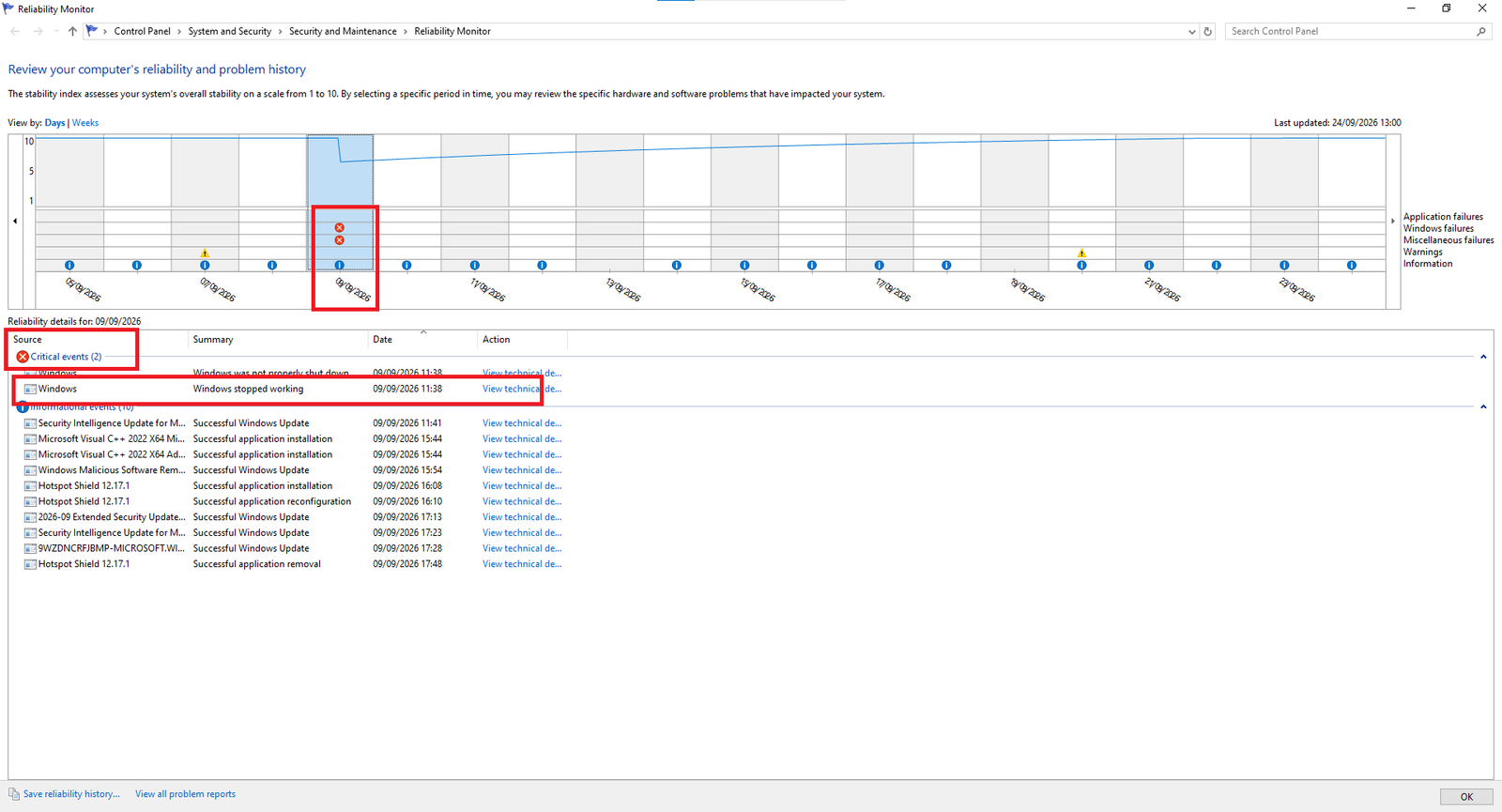
Reliability Monitor is the quickest way to confirm that Windows logged the crash and to see what else changed on the same day. It is easier to read than Event Viewer, so check it first.
- Click Start, type Reliability Monitor, and open View reliability history. You can also press Windows + R and run perfmon /rel.
- Look at the graph. A red circle with an X is a failure. A blue information icon is a software installation or an update.
- Click a day that has a red X for your app. The list below the graph shows the app name under Application failures.
- Double-click the entry, or choose View technical details, and read Problem Event Name, Fault Module Name and Exception Code. Copy or screenshot them.
Now compare the dates. If the first red X appears right after a blue icon for a Windows update, a driver, or a new program, that change is a strong suspect. Uninstall or roll back only that one item and test again, so you know what made the difference.
Read the crash details in Event Viewer
Event Viewer shows the same crash with more detail. Use it when the crash repeats and the earlier steps did not solve it.
- Right-click Start and choose Event Viewer.
- Open Windows Logs → Application.
- In the right pane click Filter Current Log, tick Error, and type 1000,1002 in the Event IDs box. Event ID 1000 is an application crash and 1002 is an application hang. Click OK.
- Click the newest event that mentions your app. On the General tab read the Faulting application name, Faulting module name and Exception code.
The faulting application name is the program that crashed. The faulting module name is the file inside it where the crash happened, and this is the useful clue. A generic name such as ntdll.dll or KERNELBASE.dll does not prove that Windows is broken, because many crashes pass through those files. A file from another company is more telling. For example, nvwgf2umx.dll usually belongs to an NVIDIA graphics driver and atidxx64.dll to an AMD one, so update or roll back that driver. A DLL that belongs to an overlay or plug-in points to that tool. If the module is a file of the app itself, the app is the most likely source and the fix is an update or a clean reinstall.
These exception codes are common:
| Exception code | What it usually means | What to try |
|---|---|---|
| 0xc0000005 | Access violation: the app used memory it should not | Update or reinstall the app, disable plug-ins and overlays, update the graphics driver. If many apps show it, test the memory. |
| 0xc0000409 | The app stopped itself after an internal safety check failed | Update the app, remove plug-ins, check the graphics driver |
| 0xc000007b | The app and one of its DLL files do not match, such as 32-bit with 64-bit | Install the Visual C++ Redistributable in both x86 and x64, then reinstall the app |
| 0xc0000142 | A required DLL could not start | Repair the runtimes, check security software, reinstall the app |
| 0xc0000135 | A required component, such as .NET, was not found | Install the .NET or Visual C++ version that the app needs |
| 0xe0434352 | An unhandled .NET exception | Look at the .NET Runtime event just before it for details, and update the app |
These meanings are general. Search for the exact code together with the name of the app and treat the results as clues, not as proof.
Repair the Visual C++ and .NET runtimes the app depends on
Many Windows programs depend on shared components called runtimes. If one is missing or damaged, the app can crash at launch, often with exception codes such as 0xc000007b, 0xc0000142 or 0xc0000135.
Visual C++ Redistributable
- Open Settings → Apps → Installed apps and search for Visual C++.
- Select Microsoft Visual C++ 2015-2022 Redistributable (you will probably see an x64 and an x86 entry), open the three-dot menu, choose Modify, and click Repair. Do this for both entries.
- If the entries are missing, download the current installers from the Microsoft page called Latest supported Visual C++ Redistributable downloads. Install both the x64 and the x86 versions, even on a 64-bit PC, because many apps are still 32-bit.
.NET
- Press Windows + R, type optionalfeatures and press Enter. Check that .NET Framework 3.5 and .NET Framework 4.8 Advanced Services are ticked if the app needs them.
- If the error message or the website of the app names a .NET version, install the matching .NET Desktop Runtime from the official Microsoft .NET website.
Download these files only from Microsoft. Pages that offer a DLL file to copy into the Windows folder are a common way to get malware and rarely fix the real problem. Restart the PC after installing and test the app.
Repair, reset or cleanly reinstall the application
Go from the least destructive option to the most destructive one. The difference between Repair and Reset matters, because Reset deletes the data of the app.
Option 1: Repair. Open Settings → Apps → Installed apps (in Windows 10: Apps & features), select the app, and open Advanced options (in Windows 11 it is under the three-dot menu). If a Repair button is shown, click it. Repair tries to fix the app and keeps its data. Not every desktop program offers this button. For some, the Modify option opens the installer of the program with its own repair choice.
Option 2: Reset. In the same Advanced options page, Reset returns the app to its original state and deletes its data on this PC. Use it only after Repair fails and after you have saved what you need.
Option 3: Clean reinstall.
- Save your work first. Copy your projects or documents, note any license key or sign-in details, and copy the app settings folders from %appdata% and %localappdata% to a safe place.
- Uninstall the app from Settings → Apps → Installed apps.
- Restart Windows.
- Download a fresh installer from the official website of the developer or from the Microsoft Store, and install it.
- Open the app and test it before you restore any old settings. If it works, restore your old files and settings one at a time, so you can notice if one of them brings the crash back.
If the uninstall itself fails, the app may be using a damaged installer record. Try the uninstaller from the program folder, and use removal tools only from the developer of the app or from Microsoft.
Check compatibility and system resources
Some crashes simply mean that the PC does not have enough resources for the app, or that the app was built for an older version of Windows.
Compare your PC with the requirements of the app. Open Settings → System → About to see your processor and installed RAM, and press Windows + R and run winver for the Windows version. Check these against the requirements listed on the official page of the app. Heavy programs such as video editors, design tools and modern games often need more RAM and a better graphics card than a basic laptop has.
Watch memory and disk while it crashes. Press Ctrl + Shift + Esc to open Task Manager and look at the Performance tab while you use the app. If memory is close to 100 percent, close other programs or add RAM. Also open Settings → System → Storage: when the system drive is almost full, Windows and apps run out of room for temporary files, and crashes become more likely.
Try compatibility settings for older programs.
- Find the program file (right-click the shortcut and choose Open file location), right-click the .exe file, and choose Properties.
- Open the Compatibility tab and click Run compatibility troubleshooter, or tick Run this program in compatibility mode for and choose an older version of Windows.
- Change one setting at a time. Useful ones to test are Disable fullscreen optimizations (for games and full-screen apps) and Run this program as an administrator.
- Click Apply and test the app.
Microsoft Store apps do not have this tab, and compatibility mode should not be used for antivirus or system utilities. If the app is old and its developer no longer supports it, a modern replacement may be a better solution than forcing it to run.
Heat. If the PC gets very hot or shuts down during heavy use, dust in the vents and a blocked fan can cause crashes under load. Clean the vents and use the PC on a hard surface.
Check Windows system files, drivers and memory when several apps crash
If more than one app crashes, the cause is more likely in Windows, a driver, or the hardware than in any single program.
Repair Windows system files.
- Right-click Start and choose Terminal (Admin) or Command Prompt (Admin).
- Type sfc /scannow and press Enter. This can take 10 to 20 minutes. Do not close the window.
- If it reports that it found files it could not repair, run DISM /Online /Cleanup-Image /RestoreHealth, wait for it to finish, run sfc /scannow again, and restart the PC.
Test the memory. Click Start, type Windows Memory Diagnostic, open it, and choose Restart now and check for problems. After the restart, the test runs and Windows reports the result when you sign in. If you do not see it, open Event Viewer and go to Windows Logs → System, then look for events from MemoryDiagnostics-Results. Errors here point to faulty RAM, which can cause random crashes in many apps.
Review the graphics driver. If the crashes began after a driver update, open Device Manager → Display adapters, double-click your graphics card, open the Driver tab, and choose Roll Back Driver if it is available. If the crashes continue on the current driver, reinstall the latest driver from the manufacturer and choose the clean installation option if the installer offers it.
Remove a bad Windows update. If Reliability Monitor showed that the crashes started right after a Windows update, open Settings → Windows Update → Update history → Uninstall updates and remove that update, then pause updates for a short time until a fix is released.
Prevent repeat crashes and know when to ask for help
A few habits make the next crash easier to deal with:
- Create a restore point before you install a new driver or a large program. Search for Create a restore point in the Start menu.
- Download software only from the official site of the developer or from the Microsoft Store.
- Keep Windows, your graphics driver and your important apps updated, but install a major driver update when you are not in the middle of work.
- Keep installers and license keys of important programs in a safe folder, so a clean reinstall takes minutes.
Ask the developer or the support team of the app for help when the crash survives a clean reinstall, or when only that one app crashes on a PC that is otherwise healthy. Send them the app name and version, your Windows version, the details from Reliability Monitor or Event Viewer (the faulting module name and the exception code), what you tried, and a screenshot of the error. Remove personal information from the screenshot before you send it.
Frequently asked questions
Should I run every program as administrator?
No. Elevated permissions should be used only when an application actually requires them. Running everything with administrator rights increases the impact of mistakes.
Why does an app work after reinstalling it?
Reinstallation can replace damaged program files and reset configuration data, but the underlying cause may return if an incompatible driver or setting remains.
Can Event Viewer tell me exactly what is wrong?
It can provide useful error details and a faulting module, but those entries are clues that should be interpreted alongside the timing and symptoms.