Android Battery Draining Fast? Find the Cause Before Replacing the Battery
By Jethro Sedoguio Writer & Editor, TechGuide PH · Updated September 9, 2026 · 4 min read
Fast battery loss can come from a bright display, weak cellular signal, location services, demanding apps, background activity, or battery aging. Use Android's battery information to identify the biggest contributor before changing many settings.
Why an Android Battery Drains Fast and How to Diagnose It
When an Android phone loses charge quickly, it is tempting to assume that the battery is worn out. Sometimes it is, but many cases are caused by a heavy app, a bright or high-refresh screen, weak signal, location tracking, or a software problem. Replacing the battery before finding the cause can cost money and leave the same problem in place.
This guide helps you identify the cause step by step, from the settings that matter most to the signs of a battery that genuinely needs replacing. Menu names differ between Samsung, Xiaomi, Pixel, and other brands, so use the search box in Settings if an option is not where described. Change one thing at a time and compare results over a full day.
Identify the Apps Using the Most Power
The first step is to find out what is actually using the battery. Guessing leads to turning off useful features while the real cause keeps running.
- Charge the phone to 100 percent, unplug it, and use it normally for several hours or a full day.
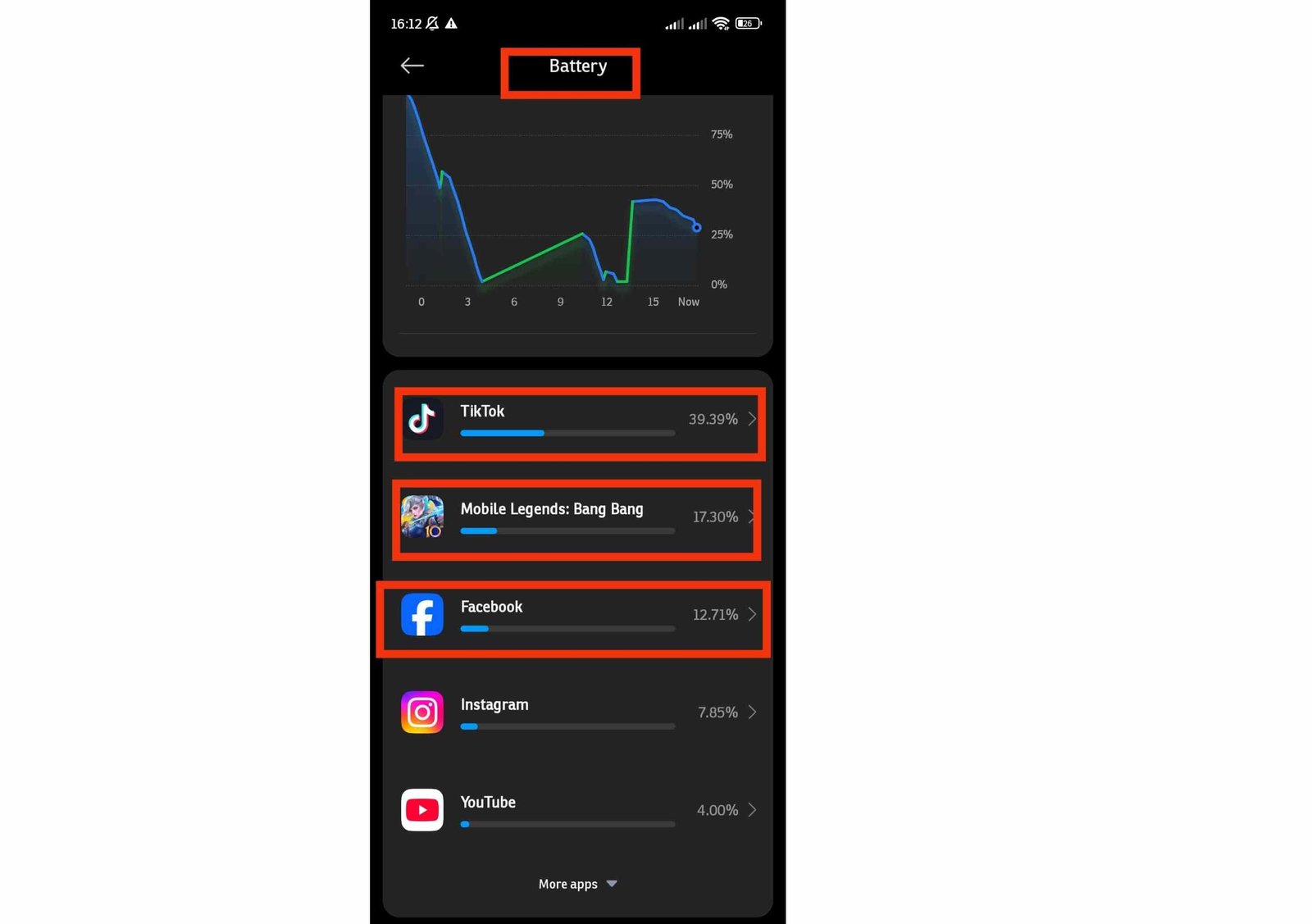
- Open Settings > Battery and tap Battery usage.
- Review the list of apps and the percentage each one used. Tap an app to see how much of its usage came from the screen and how much from the background.
- Compare the list with what you did. An app that shows a high percentage even though you barely opened it deserves attention.
Some entries are normal. The screen and Android System often rank high. Be concerned when a social media app, a game, a shopping app, or an unknown app is consuming a lot while you did not use it.
For a suspicious app, try these actions in order: update it from the Play Store, restrict its background activity in Settings > Apps > [app] > App battery usage, and uninstall it if you do not need it.
How to verify: Check Battery usage again after another full day. The app should now show a lower percentage.
Adjust the Display Settings
On most phones, the screen is the largest single user of battery. Small changes here can add noticeable time between charges.
- Open Settings > Display.
- Lower the Brightness when you do not need the maximum, and turn on Adaptive brightness if it behaves well on your phone.
- Tap Screen timeout and choose a shorter time, such as 30 seconds or 1 minute.
- If your phone has a high refresh rate screen, look for Smooth display, Refresh rate, or a similar option and switch to the standard 60 Hz mode to save power.
- Turn off Always-on display if you do not use it.
If your phone has an OLED or AMOLED screen, using Dark theme can reduce power use because dark pixels need less energy. On an LCD screen the effect is small. Animated or live wallpapers also use more power than a still image.
How to verify: Compare the screen percentage in Battery usage over a similar day before and after the changes.
Review Location, Connectivity, and Background Activity
Features that constantly check your location or connect to the internet in the background can drain the battery even when the screen is off.
Location
- Open Settings > Location > App location permissions.
- Check the apps set to Allow all the time. Change the ones that do not need constant tracking to Allow only while using the app or Ask every time.
- Deny location access to apps that do not use it for anything useful.
Connectivity and sync
- Turn off Bluetooth, NFC, and Hotspot when you are not using them.
- Open Settings > Passwords & accounts and turn off automatic sync for accounts you rarely use.
- Open Settings > Notifications and turn off notifications from apps that do not need to interrupt you. Each notification wakes the screen and the radio.
Do not restrict messaging, banking alerts, calendar reminders, or security apps, because you may miss important notifications.
How to verify: Look at the background usage of the affected apps in Battery usage after a day.
Use Battery Saving Modes Strategically
Android includes tools that reduce power use. They are most useful when you understand what they change.
- Battery Saver (Settings > Battery > Battery Saver): reduces background activity and may limit visual effects and performance. You can schedule it to turn on automatically at a set battery level, such as 20 percent.
- Adaptive Battery or adaptive preferences: learns which apps you use less often and limits their background activity. Leave it on unless you notice that an important app is being delayed.
- Extreme or maximum power saving modes (available on some brands): limit the phone to essential apps. They are good for emergencies, but not for everyday use.
Battery saving modes have trade-offs. Notifications may arrive late, background syncing may pause, and the phone may feel slower. They are tools for stretching a charge, not proof that the battery is defective, and they do not fix an app that is misbehaving.
Avoid task killer or booster apps. Closing and reopening apps repeatedly often uses more power than leaving them alone.
How to verify: Use the same routine for a day with the mode enabled and compare the remaining battery at the end of the day.
Check Signal Strength and Network Settings
When the phone has a weak mobile signal, it raises the power of its radio to stay connected. If you live or work in a place with poor coverage, the battery can drain faster even if you barely use the phone.
- Notice whether the signal bars are low where you spend most of the day, such as inside a building or at a desk.
- Use Wi-Fi when it is available. Wi-Fi usually draws less power than a weak mobile connection.
- Consider Wi-Fi calling if your carrier supports it and mobile reception is poor indoors. The option is usually in Settings > Network & internet or in the Phone app settings.
- If your area has unstable 5G coverage, open Settings > Network & internet > SIMs, select your SIM, and try Preferred network type set to 4G or LTE. Switch back if you notice slower speeds where 5G is reliable.
- Use airplane mode in places with no signal at all, such as some basements and elevators, so the phone does not keep searching for a network.
How to verify: In Battery usage, look for entries related to Mobile network standby or cell standby. If that entry was high and becomes lower after the change, signal was part of the problem.
Rule Out a Software Problem
A software fault can keep the processor awake and use power constantly. This is more likely when the drain began suddenly, for example after an update or after installing a new app.
- Restart the phone. This clears stuck processes.
- Install updates. Update Android in Settings > System > Software updates and update apps in Google Play Store > Manage apps & device. Developers often fix battery bugs in later versions.
- Allow time after a major update. After a large Android update, the phone may spend a day or two optimizing apps and indexing files, which can temporarily increase battery use.
- Test in Safe Mode. Press and hold the power button, touch and hold Power off, and tap OK. Use the phone for several hours. If the battery lasts much longer, an installed app is probably responsible.
- Remove the suspect. Think about which apps you installed shortly before the drain started and remove them one at a time.
- Scan for unwanted apps. Open Play Store > profile picture > Play Protect > Scan.
How to verify: Return to normal mode and compare a full day of battery use with the previous days.
Check Battery Health and Charging Habits
Lithium-ion batteries wear with use. After a couple of years of regular charging, the maximum capacity decreases, so the phone may run for a shorter time than when it was new.
Check the battery condition
- Open Settings > Battery and look for Battery health or a similar option. Availability depends on the phone and Android version.
- On Samsung phones, the Samsung Members app has diagnostics that include battery status.
- If your phone has no built-in information, an authorized service center can test the battery condition.
Charging habits that protect the battery
- Avoid heat. Do not charge the phone under a pillow, in direct sun, or inside a thick case that traps heat.
- Avoid letting the battery drop to 0 percent often, and avoid leaving it at 100 percent for many hours every day.
- Turn on charging protection if your phone has it, for example Adaptive charging on Pixel phones or Battery protection on Samsung phones, which limit or slow charging at the top end.
- Use the original charger or a certified one. Very cheap, uncertified chargers can charge poorly and damage the battery.
Safety warning: If the back of the phone is bulging, the screen is lifting, or the phone becomes very hot, stop using and charging it and take it to a service center. A swollen battery is a safety risk.
Decide Whether the Battery Really Needs Replacement
After checking the apps, display, connectivity, and software, you can judge more confidently whether the battery itself is at fault.
These signs point toward an aging battery:
- The phone loses a large amount of charge overnight with the screen off, even though no app stands out in Battery usage. A healthy phone usually loses only a small percentage during the night.
- The phone shuts down suddenly at 20 or 30 percent, or the percentage jumps down quickly.
- Battery health information shows reduced capacity.
- The phone is several years old and has been charged daily for most of that time.
- The battery runs out quickly even in Safe Mode and after a clean software state.
If you decide to replace the battery, use the manufacturer or an authorized service center. Cheap batteries from unknown sellers may have lower capacity and can be unsafe. Back up your data before handing in the phone.
If the phone is old and no longer receives updates, compare the cost of a new battery with the value of the device before deciding.
Conclusion
Before replacing an Android battery, look at the evidence. Check which apps use the power, adjust the display, review location and background activity, consider signal strength, and rule out a software fault in Safe Mode. Then look at battery health and charging habits.
If the drain remains high after all of that, or the phone shuts down unexpectedly, the battery is a likely cause and replacement through an authorized service is a reasonable next step.
Frequently asked questions
Why does my phone lose battery overnight?
Check battery usage after an overnight period and look for apps, poor cellular reception, location activity, or synchronization that stayed active. The exact cause differs by device.
Does dark mode always save battery?
It can reduce display power on some phones with OLED-type screens, especially with large bright areas. The effect is smaller on other display technologies.
Should I keep Battery Saver on all the time?
You can, but it may delay background synchronization or reduce some device behavior. Use the mode according to how much battery life you need.